

Benchmarks#
Database-like ops benchmarks#
We reproduced the Database-like ops benchmark
including a solution using cudf.pandas. Here are the results:
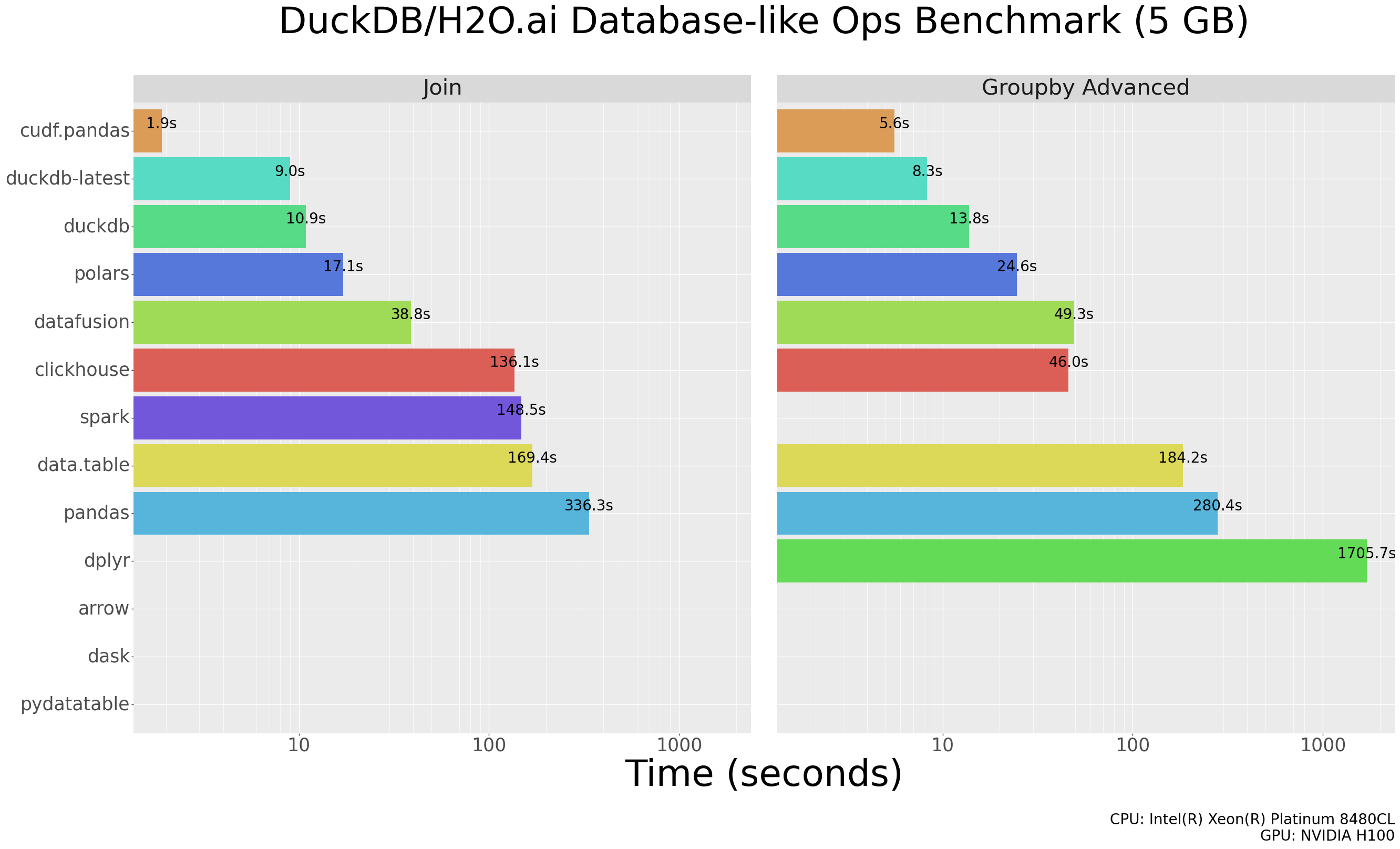
Note: A missing bar in the results for a particular solution indicates we ran into an error when executing one or more queries for that solution.
You can see the per-query results here.
Steps to reproduce#
Below are the steps to reproduce the cudf.pandas results. The steps
to reproduce the results for other solutions are documented in
duckdblabs/db-benchmark.
Clone the latest duckdblabs/db-benchmark
Build environments for pandas:
virtualenv pandas/py-pandas
Activate pandas virtualenv:
source pandas/py-pandas/bin/activate
Install cudf:
pip install cudf-cu12
Modify pandas join/group code to use
cudf.pandasand remove thedtype_backendkeyword argument (not supported):
diff --git a/pandas/groupby-pandas.py b/pandas/groupby-pandas.py
index 58eeb26..2ddb209 100755
--- a/pandas/groupby-pandas.py
+++ b/pandas/groupby-pandas.py
@@ -1,4 +1,4 @@
-#!/usr/bin/env python3
+#!/usr/bin/env -S python3 -m cudf.pandas

 print("# groupby-pandas.py", flush=True)

diff --git a/pandas/join-pandas.py b/pandas/join-pandas.py
index f39beb0..a9ad651 100755
--- a/pandas/join-pandas.py
+++ b/pandas/join-pandas.py
@@ -1,4 +1,4 @@
-#!/usr/bin/env python3
+#!/usr/bin/env -S python3 -m cudf.pandas

 print("# join-pandas.py", flush=True)

@@ -26,7 +26,7 @@ if len(src_jn_y) != 3:

 print("loading datasets " + data_name + ", " + y_data_name[0] + ", " + y_data_name[1] + ", " + y_data_name[2], flush=True)

-x = pd.read_csv(src_jn_x, engine='pyarrow', dtype_backend='pyarrow')
+x = pd.read_csv(src_jn_x, engine='pyarrow')

 # x['id1'] = x['id1'].astype('Int32')
 # x['id2'] = x['id2'].astype('Int32')
@@ -35,17 +35,17 @@ x['id4'] = x['id4'].astype('category') # remove after datatable#1691
 x['id5'] = x['id5'].astype('category')
 x['id6'] = x['id6'].astype('category')

-small = pd.read_csv(src_jn_y[0], engine='pyarrow', dtype_backend='pyarrow')
+small = pd.read_csv(src_jn_y[0], engine='pyarrow')
 # small['id1'] = small['id1'].astype('Int32')
 small['id4'] = small['id4'].astype('category')
 # small['v2'] = small['v2'].astype('float64')
-medium = pd.read_csv(src_jn_y[1], engine='pyarrow', dtype_backend='pyarrow')
+medium = pd.read_csv(src_jn_y[1], engine='pyarrow')
 # medium['id1'] = medium['id1'].astype('Int32')
 # medium['id2'] = medium['id2'].astype('Int32')
 medium['id4'] = medium['id4'].astype('category')
 medium['id5'] = medium['id5'].astype('category')
 # medium['v2'] = medium['v2'].astype('float64')
-big = pd.read_csv(src_jn_y[2], engine='pyarrow', dtype_backend='pyarrow')
+big = pd.read_csv(src_jn_y[2], engine='pyarrow')
 # big['id1'] = big['id1'].astype('Int32')
 # big['id2'] = big['id2'].astype('Int32')
 # big['id3'] = big['id3'].astype('Int32')
Run Modified pandas benchmarks:
./_launcher/solution.R --solution=pandas --task=groupby --nrow=1e7
./_launcher/solution.R --solution=pandas --task=groupby --nrow=1e8
./_launcher/solution.R --solution=pandas --task=join --nrow=1e7
./_launcher/solution.R --solution=pandas --task=join --nrow=1e8
PDS-H (TPC-H variant)#
The steps below reproduce the PDS-H benchmark results using cudf.pandas.
Setup#
Install cudf following the
RAPIDS installation guide. For nightly wheels:
CUDA_MAJOR=$(nvidia-smi | grep -oP 'CUDA Version: \K[0-9]+')
pip install --extra-index-url https://pypi.anaconda.org/rapidsai-wheels-nightly/simple/ \
    "cudf-cu${CUDA_MAJOR}>=0.0.0a0"
Then install tpchgen-cli, a Rust-based TPC-H data generator used to produce the benchmark
dataset as Parquet files:
pip install tpchgen-cli
Generate data#
Set the scale factor once and reuse it across all steps. The following generates SF50 (scale factor 50, roughly 50GB of data):
export SCALE_FACTOR=50.0
export DATA_PATH="data/tables/scale-${SCALE_FACTOR}"

tpchgen-cli parquet -o "${DATA_PATH}" -s ${SCALE_FACTOR}
tpchgen-cli generates Decimal and datetime.date columns. pandas cannot use these types
in arithmetic, so convert them to float64 and timestamp before running the benchmark. This
conversion step may not be needed in the future (see #21204).
from pathlib import Path
import pyarrow as pa
import pyarrow.parquet as pq
import os

data_path = Path(os.environ["DATA_PATH"])
tables = ["lineitem", "orders", "customer", "supplier", "part", "partsupp", "nation", "region"]

def cast_schema(schema):
    return pa.schema(
        f.with_type(pa.float64()) if pa.types.is_decimal(f.type)
        else f.with_type(pa.timestamp("ms")) if pa.types.is_date(f.type)
        else f
        for f in schema
    )

for table in tables:
    table_path = data_path / f"{table}.parquet"
    parts = [table_path] if table_path.is_file() else sorted(table_path.glob("*.parquet"))
    for part in parts:
        tbl = pq.read_table(part, schema=cast_schema(pq.read_schema(part)))
        pq.write_table(tbl, part)
Run#
CPU (--executor cpu, pandas):
python -m cudf.pandas._benchmarks.pdsh all \
    --executor cpu \
    --path "${DATA_PATH}"
GPU (--executor in-memory, cudf.pandas):
python -m cudf.pandas._benchmarks.pdsh all \
    --executor in-memory \
    --path "${DATA_PATH}"
Results#
Results are written to pdsh_results.jsonl in the current directory by default (override with -o).
Each run appends one JSON line containing metadata and a records field with per-query,
per-iteration timings:
{
  "query_set": "pdsh",
  "executor": "in-memory",
  "dataset_path": "data/tables/scale-50.0",
  "scale_factor": 50,
  "records": {
    "1": [
      {"query": 1, "iteration": 0, "duration": 0.79, "status": "success"},
      {"query": 1, "iteration": 1, "duration": 0.55, "status": "success"}
    ]
  }
}
duration is in seconds. Running multiple executors with the same -o file appends each as a
separate line, making it easy to compare CPU and GPU results in one file.