

Benchmarks#
cuML provides GPU-accelerated inference and training for classical machine learning
models. With cuml.accel, existing scikit-learn, UMAP, and HDBSCAN scripts can
benefit from similar acceleration without code changes. Exact speedups depend on
the model, dataset size, and hyperparameters, but the following benchmarks give a
general sense of the performance improvements you can expect.
Training#
Both training and inference benefit from GPU acceleration, but cuML tends to
provide larger gains for training. Training with cuML is typically 2x to 80x
faster, especially with large datasets. cuml.accel provides similar speedups
without requiring cuML-specific code changes.
Relatively complex manifold algorithms such as HDBSCAN, t-SNE, and UMAP tend to
benefit most from cuml.accel. Speedups of 60x to 300x are typical for
realistic workloads. Simpler algorithms such as KMeans and Random Forest can
also see speedups of 15x to 80x. Even algorithms such as Logistic Regression,
Lasso, PCA, and Ridge typically achieve speedups of 2x to 10x.
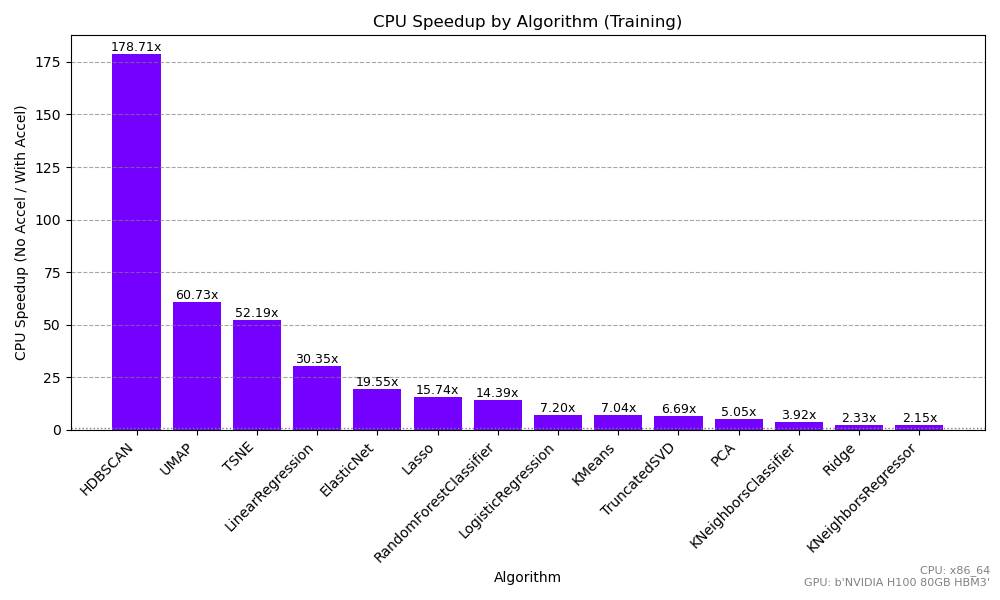
The following chart shows the relative speedup from running the same code with
and without cuml.accel. The datasets range from 8 to 512 features.
cuml.accel provides the largest improvement for HDBSCAN, with a 179x
speedup, while KNeighborsRegressor still achieves a 2x speedup.
What’s the overhead compared to invoking cuML directly?#
Although cuml.accel aims to provide as much acceleration as cuML-specific
code, it introduces some overhead relative to calling cuML directly. Whether it
is worth rewriting code to use cuML directly depends on the estimator,
parameters, and data size. The overhead is typically low for model training,
although it varies by algorithm:
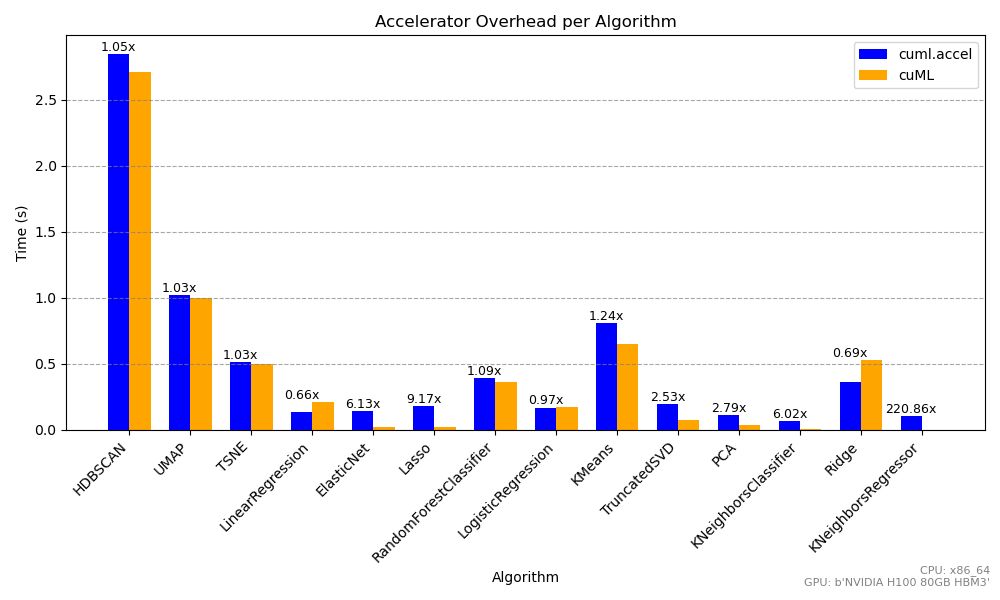
Training is typically computationally expensive, so data transfers between the
CPU and GPU and the accelerator’s other overhead do not significantly affect
the total runtime. The overhead is more noticeable for simpler tasks, such as
training KNeighbors models. Calling cuML directly can be significantly
faster for these workloads when maximum GPU performance is required, although
the difference in execution time may be a matter of seconds versus
milliseconds.
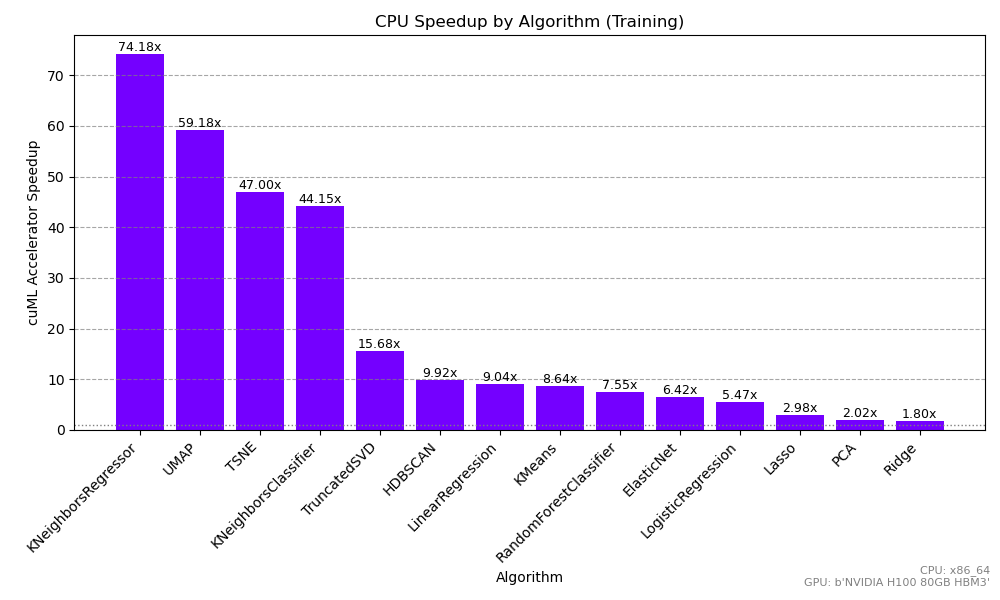
Dataset shape also influences these gains. Skinny datasets have relatively few features but many rows. GPU acceleration still provides a substantial performance improvement for these datasets, although the relative advantage may be smaller for simpler algorithms that are already fast on the CPU. The following benchmark shows speedups for datasets with 8 and 16 features:
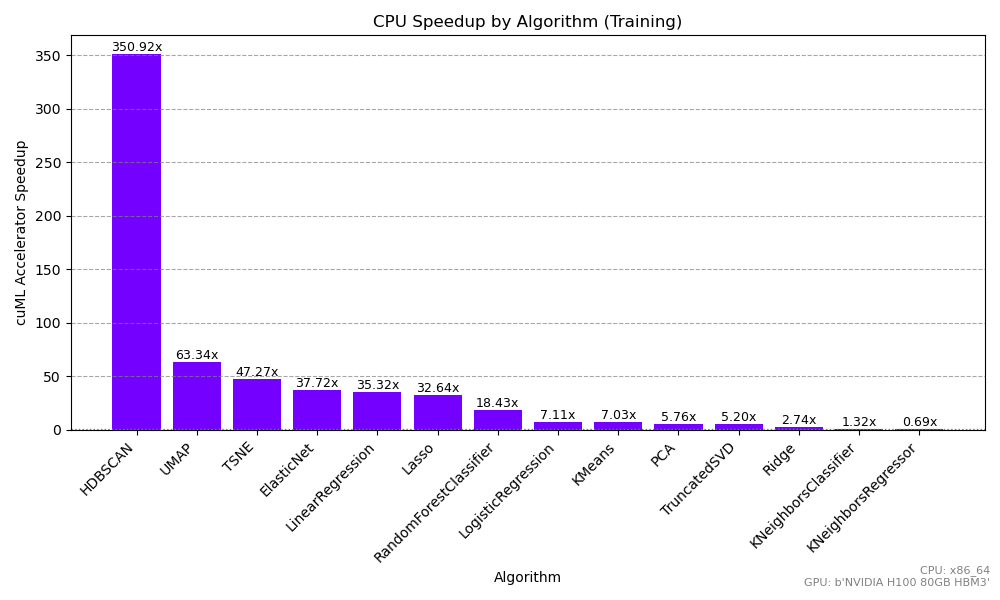
Wide datasets particularly benefit from the accelerator. High-dimensional tasks
often require substantial computation and can be impractical in CPU-based
workflows. cuML and cuml.accel provide some of their largest speedups for
these datasets, especially for dimensionality reduction methods such as t-SNE
and UMAP. This can make it practical to incorporate UMAP and HDBSCAN into
complex, high-dimensional workflows. The following benchmark shows speedups for
datasets with 128, 256, and 512 features:
Inference#
The accelerator also speeds up inference, although the gains tend to be smaller because inference is usually much faster than training. A 2x to 7x improvement, as observed with KNeighbors and Random Forest, can still be important for large-scale or real-time predictions. GPU acceleration can be particularly valuable for large-batch or repeated inference.
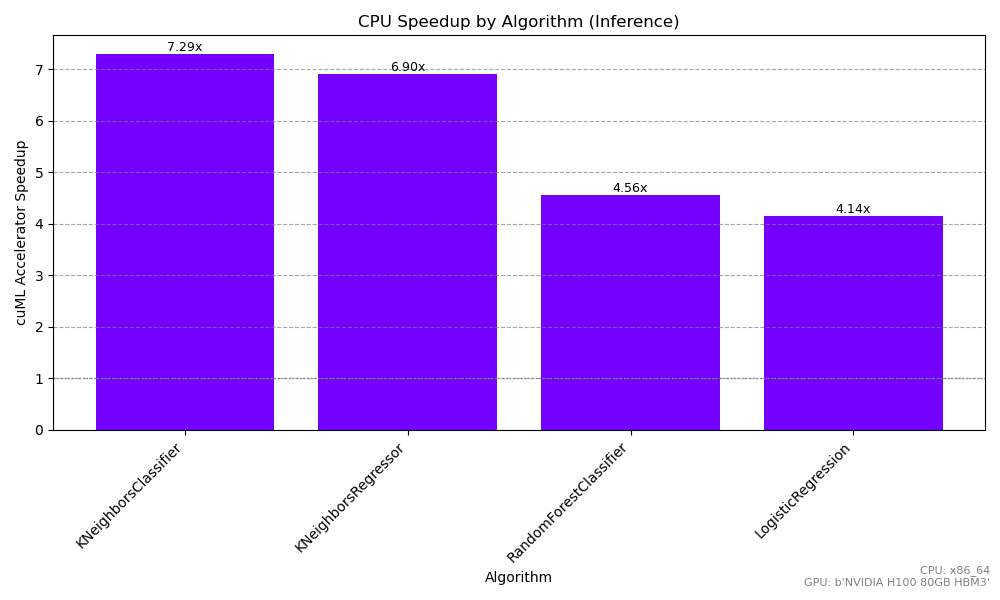
For smaller datasets, data transfer accounts for a larger portion of the total runtime. With many small batches, this overhead may offset most or all of the benefit of running an accelerated algorithm on the GPU. These workloads benefit from keeping inputs and outputs on the GPU, for example as CuPy arrays. Because accelerator mode does not support this optimization, consider calling cuML directly with GPU-native data types for these workflows.
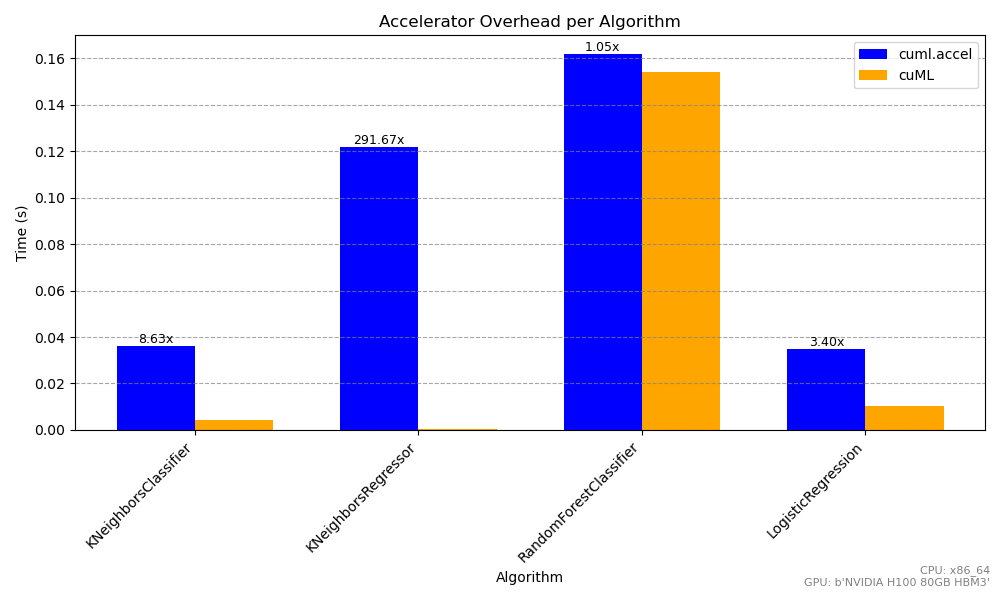
Overall, these benchmarks show that cuml.accel can reduce training times
across a range of machine learning tasks while also improving inference, without
requiring changes to existing code.